10 Coordination of Distributed Cyber-Physical Systems
The purpose of this exercise is to learn about the challenges in coordinating distributed nodes in cyber-physical systems, including the fundamental tradeoff among consistency, availability, and latency described by the CAL theorem. In this exercise, we are not using the Pololu robot.
10.1 Prelab
Questions
-
Read the first seven paragraphs of the Introduction of the paper "Consistency vs. Availability in Distributed Cyber-Physical Systems".
- Consider a warehouse where multiple distributed robots work together. Since the aisles are narrow, the robots share information about aisle occupancy to avoid collisions or blocking each other. Therefore, it is important to ensure that all robots have the same view of the current aisle occupancy. Which of the following properties is most directly related to this requirement: consistency, availability, or latency? Briefly explain your answer.
- Consider a vehicle equipped with an advanced driver assistance system (ADAS), where both an autonomous vision-based system and the physical brake pedal can trigger the braking system. When either input source generates a braking request, it is important to activate brakes as quickly as possible. Which of the following properties is most directly related to this requirement: consistency, availability, or latency? Briefly explain your answer.
- The paper mentions that network partitioning is a limiting case of network latency. How could we express network partitioning in terms of network latency? Specifically, consider two distributed nodes where the network latency is
L. What would be the value ofLif the network is partitioned?
-
In Lingua Franca, the term lag is defined as physical time minus logical time (LF Handbook - time and timers). For instance, if a reaction is executed at physical time
106 ms, where the scheduled logical time is100 ms, the lag is6 ms.- True or False: In general, a larger lag corresponds to lower availability. Briefly explain your answer. Hint You can refer to Section 4.2 in the CAL theorem paper.
- Can lag become negative in Lingua Franca under the default execution semantics of the reactor model? Briefly explain your answer.
-
Extracting values from PyTorch tensors. A pretrained object detection model returns a dictionary containing three tensors:
prediction["labels"]contains object category IDs,prediction["scores"]contains confidence scores, andprediction["boxes"]contains bounding boxes in the form[x1, y1, x2, y2]. The following loop examines one detection at a time:for label, score_tensor, box_tensor in zip( prediction["labels"], prediction["scores"], prediction["boxes"] ): # Examine this detection. pass- Here,
labelandscore_tensorare zero-dimensional tensors. Write Python expressions that extract the label as an integer and the confidence score as a floating-point number. How would you check whether the label is1, the COCO category ID for a person? box_tensorcontains four coordinates. Write Python code that extracts these coordinates intox1,y1,x2, andy2. Which expression gives the horizontal center of the bounding box?
Hint: Review the PyTorch tensor methods
.item()and.tolist(). - Here,
10.2 ADAS Example
Prerequisites
Download the following lab files:
You can use the my-3pi repository created in Getting Started, or create a new folder for this exercise. We will refer to this folder as the project root, represented by <root> below.
Save ADASPolyglotTemplate.lf and ProtoAdas.proto in <root>/src/, creating src/ if needed, and save pedestrians.zip in <root>/. The ZIP contains a data/ folder with 11 images selected from the Caltech Pedestrians dataset and an ATTRIBUTION.txt file. Extract the ZIP from <root>. Your files should have the following layout:
<root>/
├── src/
│   ├── ADASPolyglotTemplate.lf
│   └── ProtoAdas.proto
└── data/
    ├── image_1.png
    ├── ...
    ├── image_11.png
    └── ATTRIBUTION.txt
Keep data/ alongside src/, and run all compilation and execution commands from the project root so that the programs can find the images.
When setting up the environment on Ubuntu or WSL, install the Protocol Buffers compilers, the protobuf-c development library, and the Python development headers:
sudo apt install protobuf-compiler protobuf-c-compiler libprotobuf-c-dev python3-dev
On Mac, install Protocol Buffers with Homebrew:
brew install protobuf protobuf-c
From the project root, create and activate a Python virtual environment, then install the Python dependencies:
python3 -m venv my_env
source my_env/bin/activate
pip install protobuf
pip install torch torchvision --index-url https://download.pytorch.org/whl/cpu
If creating the virtual environment fails because venv is unavailable on Ubuntu or WSL, install it with sudo apt install python3-venv. If you are using a specific Python version, you may need to install the corresponding package instead (e.g., sudo apt install python3.12-venv for Python 3.12). Keep the virtual environment activated when compiling with lfc and running the Python federate so that the compiler can find the correct Python environment. When you open a new shell, return to the project root and reactivate it with source my_env/bin/activate.
Exercise
In this exercise, you will complete a pedestrian detector for an advanced driver assistance system (ADAS) shown below:
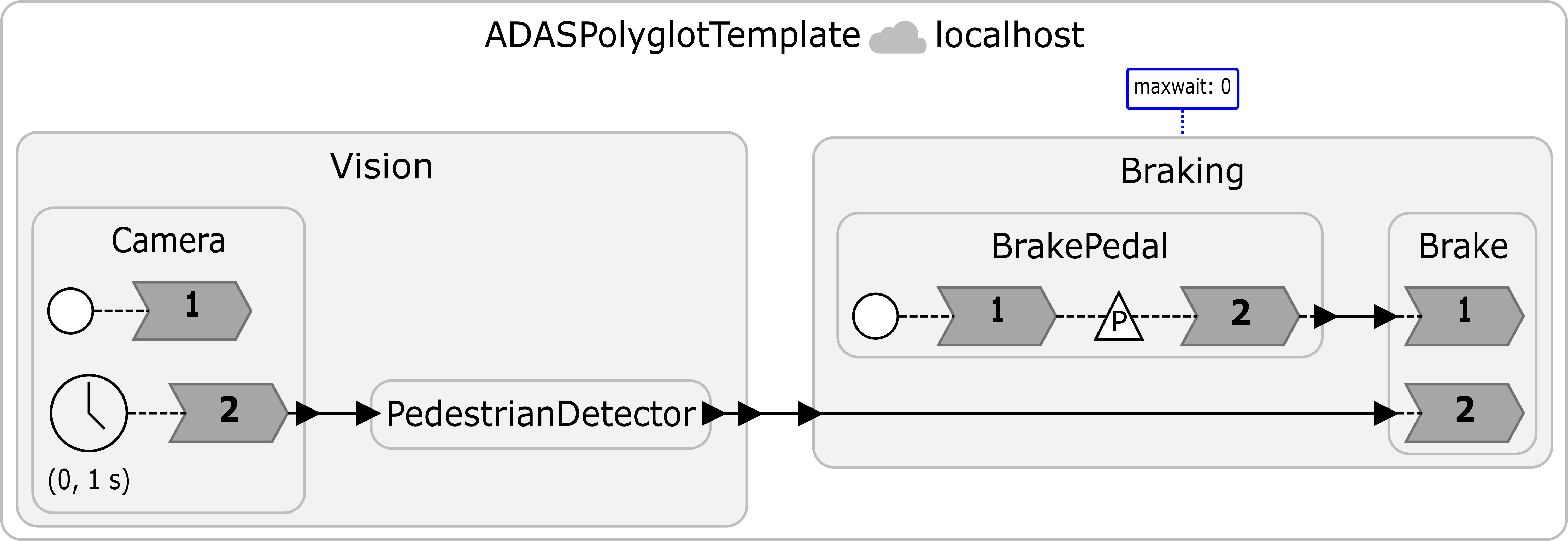
The program ADASPolyglotTemplate.lf is a polyglot federation, a collection of federates implemented in Python and C target languages. The Vision federate uses Python for image processing, while the Braking federate uses C for the brake pedal and brake reactions. The @language annotations specify their languages, and the proto serializer lets them exchange Protocol Buffers messages. Read the LF Handbook section on Polyglot Federations for more information.
First, examine and run the template with the following commands:
lfc src/ADASPolyglotTemplate.lf
./bin/ADASPolyglotTemplate
lfc will create three separate executables (federate__vision, federate__braking, and RTI) in fed-gen/ADASPolyglotTemplate/bin/, along with the script (bin/ADASPolyglotTemplate) running all executables.
The Camera reactor reads the images in numeric order and repeatedly sends them on a timer with a period of 1 sec. PedestrianDetector loads a pretrained torchvision Faster R-CNN model and runs inference on each frame. However, the unfinished condition skips every detection, so the template reports no pedestrian hazard and sends no automatic brake requests. BrakePedal schedules a manual brake event every 5 s.
Note: The actual reaction times depend on computation delays. Since we're using CPU (not GPU) for inference, we set the period of inference to 1 sec to give enough time for each inference.
Your task is to complete the TODOs in PedestrianDetector. A detection should trigger an automatic brake request only if all of the following conditions hold:
- The object has COCO category ID
1(person). - Its confidence score is at least
0.90. - The horizontal center of its bounding box is between 30% and 70% of the image width, inclusive. This region represents the road area for this exercise.
Set hazard to True and break out of the loop when you find a qualifying detection. The provided code then sends a ProtoAdas message to Braking.
Please put your program in a file called ADASPolyglotSolution.lf.
Hint: Use your answers to prelab question 3 to extract the tensor values. Divide the horizontal center coordinate by image_width to compare it with the road region boundaries.
Note: You may see WARNING: Failed to accept the socket. Resource temporarily unavailable. Trying again.. This is only a warning and can be safely ignored.
Checkoff: Show one complete image cycle in which only image_10.png is identified as a pedestrian hazard. Show that the resulting automatic brake message reaches the C Braking federate.
10.3 Distributed Systems with Emulated Network latency
The program uses decentralized coordination with @maxwait(0) on Braking. A maxwait of zero means that, once physical time reaches an event's logical timestamp, Braking can advance to that timestamp without waiting for an unknown input from Vision. In particular, it can process a local brake_pedal event even if an earlier automatic brake message is still in transit. This choice prioritizes availability by sacrificing consistency: local braking can respond without waiting for remote information, but timestamp order across the two inputs is not guaranteed. The order in which events are processed can depend on message arrival times, so the system can behave nondeterministically. Please refer to the LF handbook - Maxwait for more information.
In this exercise, you will emulate network delay and compare the lag of automatic and manual braking with and without added delay. Lag is defined as $T_p - T_l$, where $T_p$ is the physical time at which a reaction processes an event and $T_l$ is the event's intended logical timestamp. A larger lag means that processing occurs later relative to the scheduled logical time.
You will use Linux's tc command to add network delay while keeping the program unchanged.
On Ubuntu and WSL, install iproute2:
sudo apt update
sudo apt install iproute2
Since Linux's tc command is not available on macOS, we provide a Docker image. For installation instructions, see Install Docker Desktop on Mac. Start Docker Desktop and run these commands in the host terminal:
docker pull byeonggiljun/cse522-lab8:arm64

docker run -it \
    --name cse522-lab8 \
    --cap-add=NET_ADMIN \
    byeonggiljun/cse522-lab8:arm64 \
    bash
The image contains the required lab files and execution environment in ~/Lab8. A virtual environment is already available at ~/Lab8/my_env; activate it before compiling or running the lab.
The NET_ADMIN capability allows you to configure network delay inside the container.
If you have already created and exited the container, reconnect with docker start -ai cse522-lab8 rather than creating another container with the same name.
First, run ping localhost and ADASPolyglotSolution.lf without added delay.
Next, run these commands on Ubuntu or inside the container to add 100 ms of delay to packets sent through the loopback interface, lo:
sudo tc qdisc add dev lo root netem delay 100ms
ping localhost
Note: When running the command inside a Docker container, omit sudo from the first line.
Ping allows you to confirm that the delay has been applied. Ideally, it will show around 200 ms of delay because the delay is applied to both incoming and outgoing directions. After confirming the applied delay, run the ADASPolyglotSolution.lf program.
./bin/ADASPolyglotSolution
After the experiment, remove the added delay and run ping localhost again to verify that the round-trip delay returns to its baseline:
sudo tc qdisc del dev lo root
ping localhost
Note: When running the command inside a Docker container, omit sudo from the first line.
Checkoff: Show your execution results with 100 ms of added network delay. Complete the table below using the lag measured in each of the two input reactions in reactor Brake, both without added delay and with 100 ms of added delay. Report all values in milliseconds.
| Input / reported lag | Without added network latency (ms) | With 100 ms added network latency (ms) |
|---|---|---|
brake_pedal (Manual braking lag) | _____ | _____ |
brake_assistant (Automatic braking lag) | _____ | _____ |
Explain how the added network delay affects the lag of each input. Does delaying the automatic brake message arrival make the local pedal event wait longer before it is processed? Explain your observations using the explanation of @maxwait(0) at the beginning of Section 10.3.
10.4 Execution on separate machines
Now, we will run Vision and Braking on two separate devices (e.g., laptops or desktops). One device (RTI device) will run the runtime infrastructure (RTI) and federate__braking; the other (Vision device) will run federate__vision.
Note: Both devices should be connected to the same network. As a sanity check, find the IPv4 address of each device and verify that they can ping each other before continuing. Some Wi-Fi routers, especially those on guest or campus networks, may prevent connected devices from communicating with each other. If possible, we recommend connecting both devices to a personal mobile hotspot instead.
For Mac users, Docker is not required for this section. We recommend running the programs directly on macOS because Docker may require additional network configuration, e.g., port forwarding.
The code that we've used so far declares the federation with federated reactor at localhost. Here, localhost indicates that all three entities, Vision, Braking, and the RTI will be running on the same machine that compiles this file. To run them on separate devices, we need to give the IP address of the RTI device.
Network Setup and Compilation
First, find the IPv4 address of the RTI device. Use that address in the federated reactor declaration on both devices. For example:
federated reactor at 192.168.0.1 {
    @maxwait(0)
    braking = new Braking()
    vision = new Vision()

    vision.trigger_brake -> braking.brake_assistant serializer "proto"
}
You should replace an example IP address, 192.168.0.1, with the IPv4 address of the RTI device.
Additional setup for WSL
-
Check whether the system supports WSL mirrored networking. Run in Windows PowerShell:
winverMirrored networking requires Windows 11 22H2 or later. If your system does not meet this requirement, skip to the troubleshooting box below.
-
Open the WSL configuration file from PowerShell (the command below will create it if it doesn't exist):
notepad $env:USERPROFILE\.wslconfigAdd the following settings. If
[wsl2]already exists, add or updatenetworkingModeunder it:[wsl2] networkingMode=mirroredThen restart WSL:
wsl --shutdownStart WSL again afterward.
-
Allow inbound connections to WSL through the Hyper-V firewall. Run in Windows PowerShell as Administrator:
Set-NetFirewallHyperVVMSetting -Name '{40E0AC32-46A5-438A-A0B2-2B479E8F2E90}' -DefaultInboundAction AllowAfter completing the experiment, restore the default inbound blocking policy with:
Set-NetFirewallHyperVVMSetting -Name '{40E0AC32-46A5-438A-A0B2-2B479E8F2E90}' -DefaultInboundAction Block
If the RTI runs inside WSL, use that device's Windows Wi-Fi IPv4 address, not its internal WSL address, in the federated reactor declaration on both devices. Find this address with ipconfig in PowerShell. See Microsoft's WSL networking instructions for details.
Troubleshooting for WSL users
If your system meets the Windows version requirement but mirrored networking does not work, try updating WSL and restarting it from PowerShell:
wsl --update
wsl --shutdown
Start WSL again and retry the setup above.
If your system does not meet the requirement, or mirrored networking still does not work, use NAT networking and port forwarding instead. If you already set
networkingMode=mirrored, change it tonetworkingMode=natand restart WSL withwsl --shutdown.On both devices, change
coordination: decentralizedtocoordination: centralizedin the target configuration before compiling. Then, federates will only communicate with the RTI.If the RTI runs inside WSL, configure forwarding from Windows TCP port
15045on that device to the RTI inside WSL:
Inside WSL, find its internal IP address:
hostname -IOpen PowerShell as Administrator on that Windows host and run:
netsh interface portproxy add v4tov4 `
    listenaddress=0.0.0.0 `
    listenport=15045 `
    connectaddress=172.25.123.45 `
    connectport=15045
Replace
172.25.123.45with the WSL IPv4 address from step 1 (you can check it by running ifconfig inside the WSL). This is only an example address. The WSL address may change after WSL restarts, so check it each time and update the forwarding rule if needed.
Distributed Execution
In this exercise, we will run each executable separately instead of using the script bin/ADASPolyglotSolution.
On each device, prepare the file structure described in Section 10.2 and compile src/ADASPolyglotSolution.lf using lfc. Use the same RTI address and coordination settings in both copies of the solution. The Vision device also needs the supplied data/ directory and the pretrained model dependencies. Run all commands from that device's project root with the Python virtual environment activated in each terminal.
First, start the RTI on the chosen device:
fed-gen/ADASPolyglotSolution/bin/RTI -n 2 -i adas-lab
The -n 2 option tells the RTI to expect two federates. In another terminal on the same device, start Braking:
fed-gen/ADASPolyglotSolution/bin/federate__braking -i adas-lab
On the other device, activate the Python virtual environment and start Vision:
fed-gen/ADASPolyglotSolution/bin/federate__vision -i adas-lab
All three programs must use the same federation ID, here adas-lab. For this experiment, start the programs individually rather than using the launcher that starts both federates together.
Troubleshooting
If the programs get stuck after launching, it's likely because of a network issue. Use
ncto check whether you can manually establish a TCP connection between the devices.Check that the firewall allows outbound and inbound TCP connections. With decentralized coordination, each federate also acts as a server, so allow inbound TCP connections on both devices. Federates typically use ports in the range
32768–65535, so allowing this range should usually be sufficient for federate connections. Also allow inbound TCP connections to port15045on the RTI device.If needed, consider allowing inbound connections on all TCP ports. As a last resort, you can temporarily disable the firewall, but this carries security risks. We recommend disabling it only briefly and turning it back on immediately after testing. We cannot help you resolve any security issues this may cause.
Devices managed by a school or institution may have other rules that you cannot change. If these block the connection, you will need to find another way to run the experiment, such as using a different device.
Checkoff: Show the execution results from both devices. Demonstrate that Vision detects the pedestrian and sends an automatic brake request that is received by Braking on the other device.
10.5 Postlab Questions
-
In the programs that we've used so far,
@maxwait(0)allows local events to proceed without waiting for remote messages, so timestamp order is not guaranteed. In many systems, however, preserving timestamp order is important. Consider a similar but slightly different system shown below: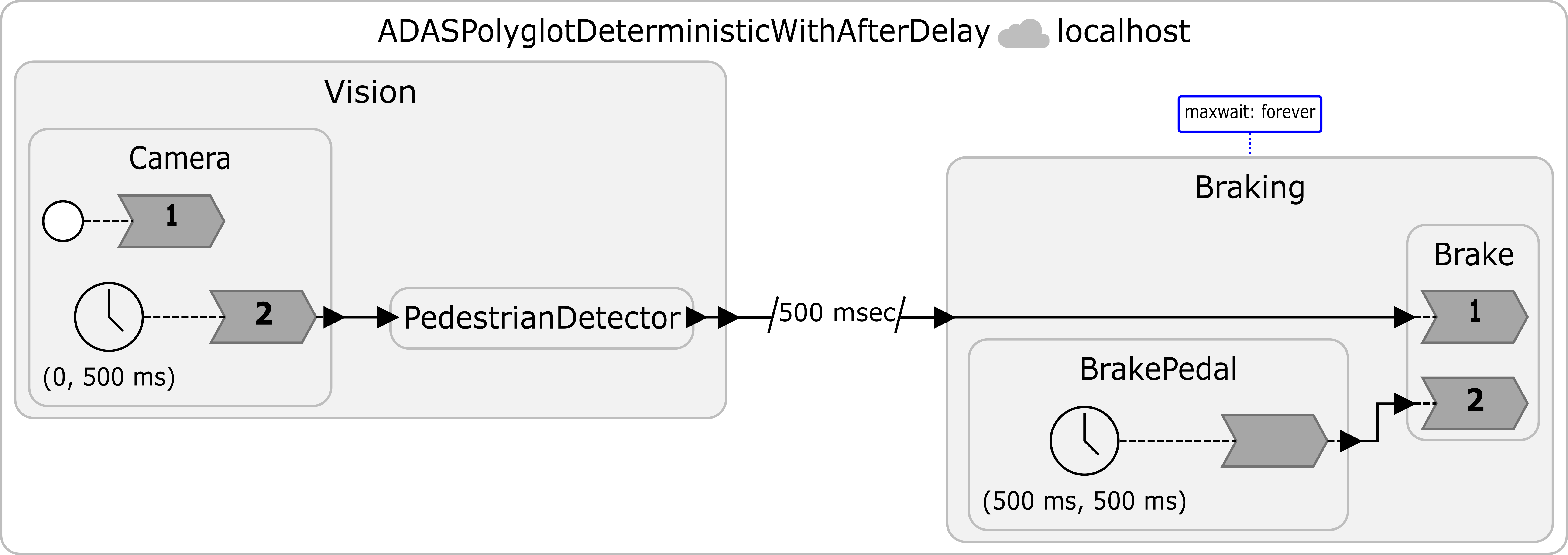 This system has the following assumptions:
- Assumption 1:
VisionandBrakePedalboth sample data and send a message every 500 ms.Visionstarts at logical time0, whileBrakePedalstarts at logical time500 ms. - Assumption 2: The connection from
VisiontoBrakinghas a500 mseclogical delay specified byvision.trigger_brake -> braking.brake_assistant after 500 msec serializer "proto". In Lingua Franca, the500 msecofafterdelay increments the timestamp at the receiving end by500 mseccompared to the timestamp at the sender. For example, whenVisionsends a message at timestamp0, reactorBrakewill process the message at timestamp500 msec. - Assumption 3:
Brakinguses@maxwait(forever), so reactorBrakewaits to process a message fromBrakePedaluntil a message fromVisionwith an equal or later destination timestamp has arrived. For example, a message fromBrakePedalwith timestamp2 secmust wait until a message fromVisionwhose timestamp atBrakeis2 secor later has arrived. This preserves timestamp order across the inputs. - Assumption 4: The system is configured so that a message from
Visionarrives atBrakingno more than 500 ms after the data is captured, including computation and communication time.
All logical and physical times are measured from the common execution start. Assume that earlier events have been processed and that processing overhead at Brake is negligible.
-
Suppose
Visionsends a message at logical time500 ms, and it arrives atBrakingat physical time800 ms. What is the earliest physical time at whichBrakecan process the message fromBrakePedalwith logical timestamp1 sec? Explain your reasoning.Hint: Use Assumption 2 to determine the destination timestamp of the message from
Vision. In other words, at what logical timestamp mustBrakeprocess the message thatVisionsends at logical time500 msin this program? Then, use Assumption 3 to determine whenBrakecan process the message fromBrakePedalwith timestamp1 sec. -
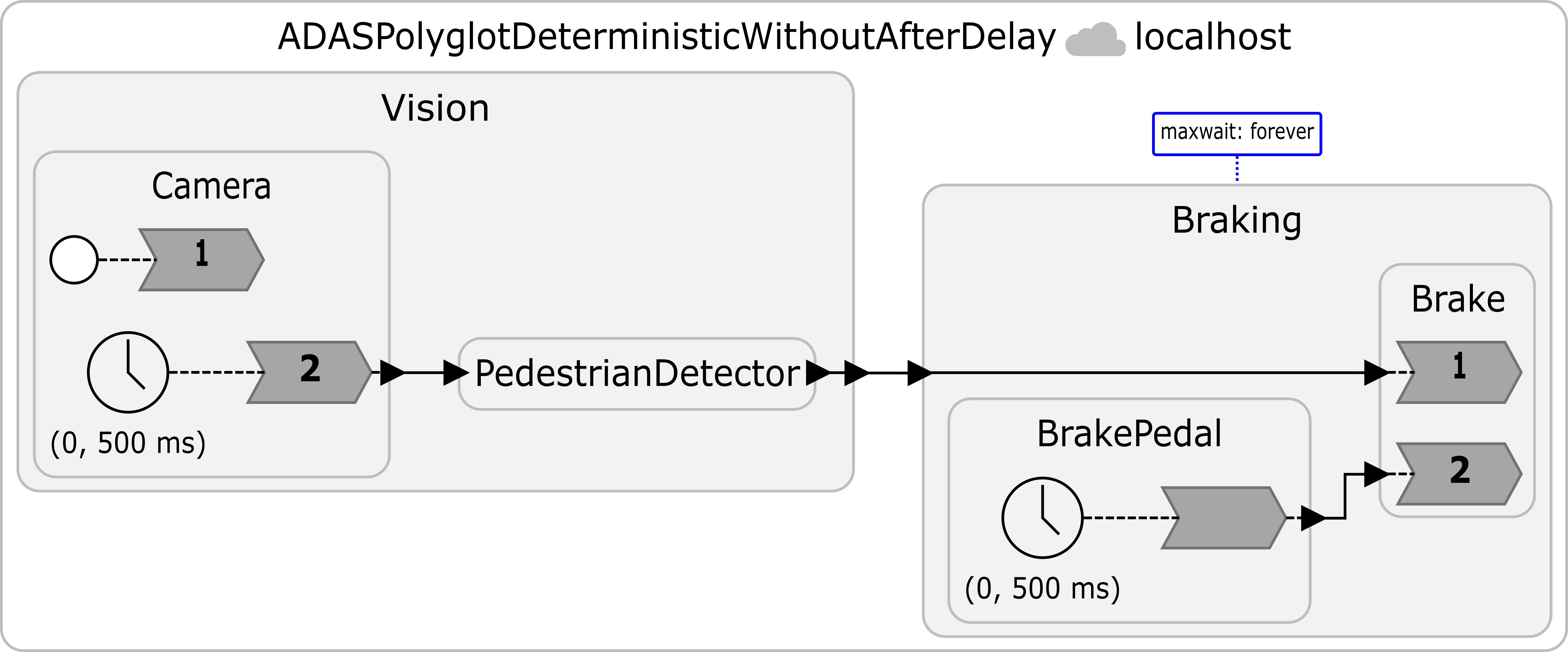
Now consider another program shown below, which removes the
afterdelay and startsBrakePedalat logical time 0. All other assumptions, including@maxwait(forever), remain unchanged. Suppose a message fromVisionsent at logical time1 secarrives atBrakingat physical time1.3 sec. What is the earliest physical time at whichBrakecan process the message fromBrakePedalwith logical timestamp1 sec? Explain your reasoning.
-
Compare your answers to (a) and (b). What is improved by adding the
afterdelay? What did the program give up in exchange?Hint: Compare the logical timestamps at which
CameraandBrakePedalsend messages with timestamps at whichBrakeprocesses the corresponding messages. Also, recall the tradeoff among consistency, availability, and latency discussed at the beginning of the CAL theorem paper (which you read while answering the prelab question).
- Assumption 1:
-
In 10.2, we detect the pedestrian by checking only the center of the bounding box. Suppose we want to make the system trigger braking only if a pedestrian is close enough. Which condition would you add to the current system to achieve this goal?
-
What were your takeaways from the lab? What did you learn during the lab? Did any results in the lab surprise you?